Bring The Winter Olympics Home with the 2026 Milan Cortina App on DISH
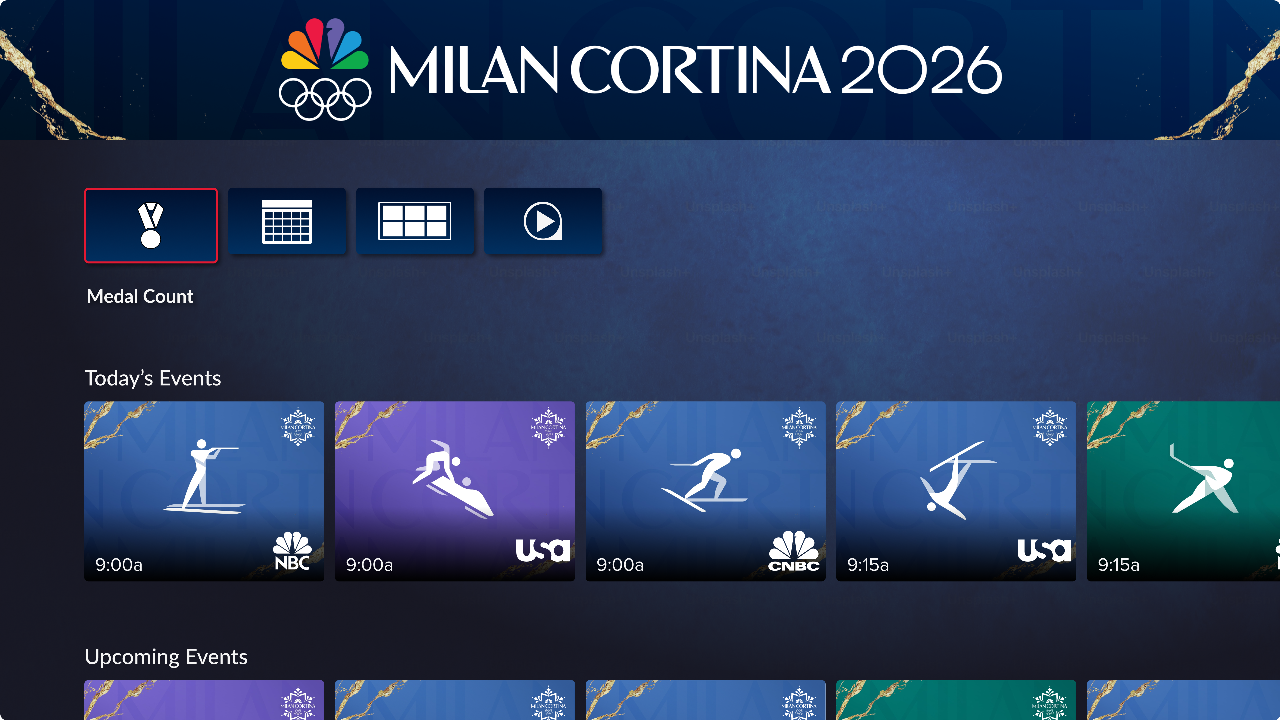
Instead of having to bundle up to watch winter sports, DISH is bundling winter sports up for you with the 2026 Milan Cortina Olympics App on DISH, which features NBCUniversal's live and replay coverage of all of The Winter Olympics events!
Available on Channel 146, the 2026 Milan Cortina Olympics App on DISH lets you keep up with the medal count, stay on top of the schedule, and watch live coverage and replays of all your favorite events, all in one place! Launching on February 3, here’s a closer look at what to expect from the 2026 Milan Cortina App on DISH! To watch the 2026 Milan Cortina Olympics with DISH, follow this link to explore plans!
How To Access the 2026 Milan Cortina Olympics App on DISH
You can access the 2026 Milan Cortina Olympics App from Feb. 3 through Feb. 23 by navigating to Channel 146, or with your DISH Voice Remote by saying, “Launch the Milan Cortina Olympics App.”
What Can I Find in the 2026 Milan Cortina Olympics App?
Your hub for the 25th Winter Olympic Games, the 2026 Milan Cortina Olympics App gives you a front row seat to the thrilling action at the 2026 Olympic Winter Games. Here’s a look at the product features:
Live Events and On-Demand Replays at the push of a button: Instead of navigating through the guide, the 2026 Milan Cortina Olympics App will have live events across NBC, USA Network, and CNBC, along with on-demand replays.
Easy recording options: With upcoming events available on the app, all you need to do is find the event you want to record, select it, and set your recording! Once your event is recorded, you can also use the app to access your recordings from the 2026 Milan Cortina Olympics App.
Medal Count: At the top of the app, you’ll notice a medal icon. Just navigate to it and give it a click to see the latest standings in the medal count, including total medals!
Access Sports Multiview to Watch Live Events Simultaneously: Because multiple events will take place at the same time, you can use the 2026 Milan Cortina Olympics App to navigate to the Sports Multiview on Channel 151. There, you’ll find pre-selected channels in a four window layout with all of the action. Use your remote to highlight the channel whose audio you’d like to hear, or click one of the windows to launch it in full-screen.
Watch Olympic Coverage 24/7 in 4K with USA Network: Select events on USA Network will be available to watch in 4K. Use the 2026 Milan Cortina Olympics App to watch on compatible devices.
What DISH Devices Have the 2026 Milan Cortina Olympics App?
The 2026 Milan Cortina Olympics App will be available on the Hopper 2, 3, Duo, and Hopper Plus, and all internet-connected Joeys. To access the full experience, these devices will need to be connected to the internet. The Sports Multiview on Channel 151 will be available on all Hoppers, Joeys, and Wallys.
How to Watch the 2026 Milan Cortina Olympics on the Go
If you’re off hitting the slopes, no worries: You can catch all of the action of The Winter Olympics with the DISH Anywhere app. As long as your Hopper device is connected to the internet, you can access live and on-demand content from The Winter Olympics no matter where you are.
At home or on the road, live or on-demand, you can catch all of the action from The Winter Olympics with the 2026 Milan Cortina Olympics App with DISH!